
Home › Semantic SEO › Topical Map Example
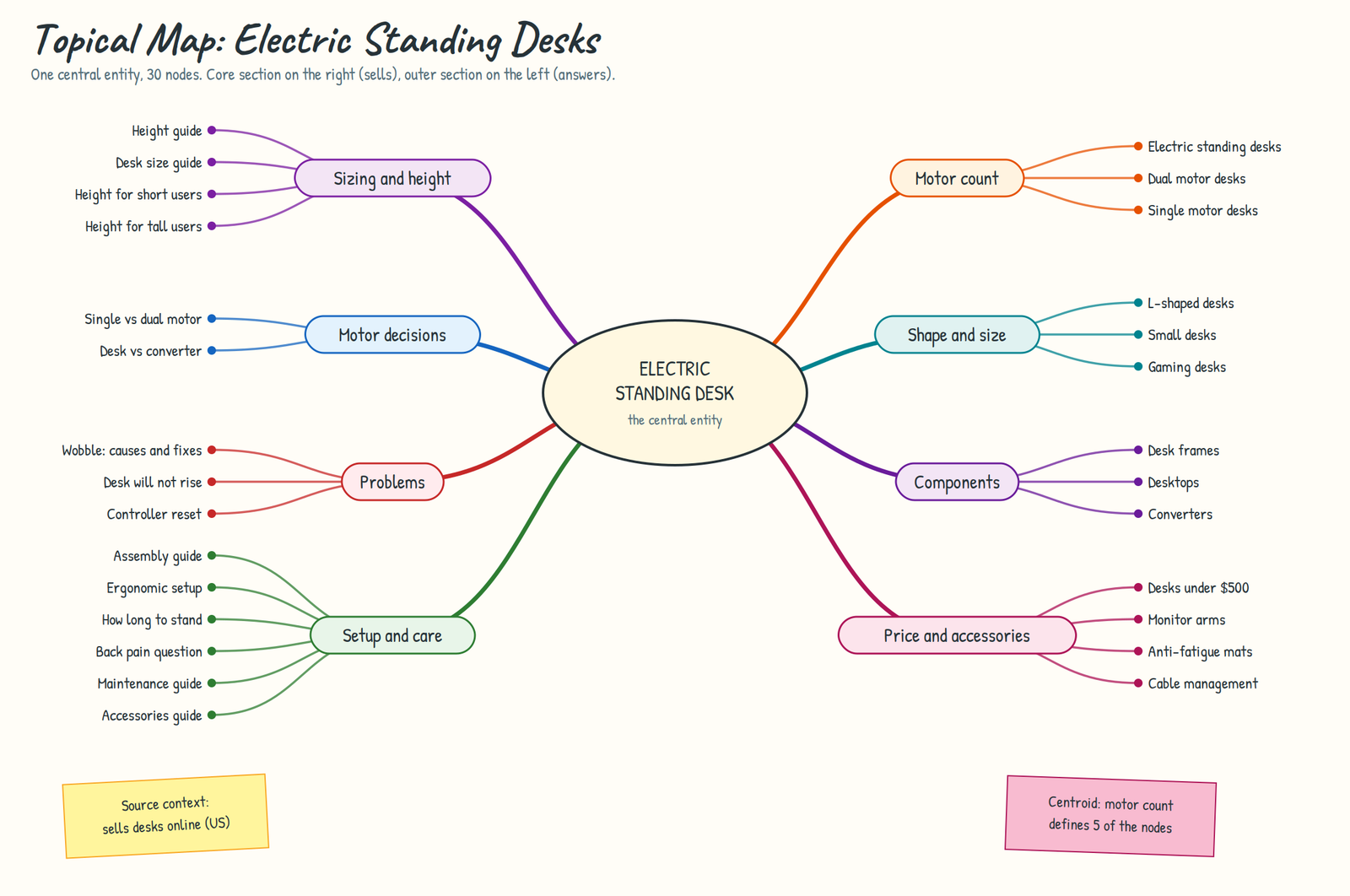
Most topical map examples show a fragment: six rows for one service, a screenshot with the client name blurred, a template with the cells left blank. A fragment cannot prove the method works, because the hard part of a topical map is not the first six rows. The hard part is the decisions: which of the 200 candidate topics becomes a page, which becomes a section, which gets merged, and which gets killed.
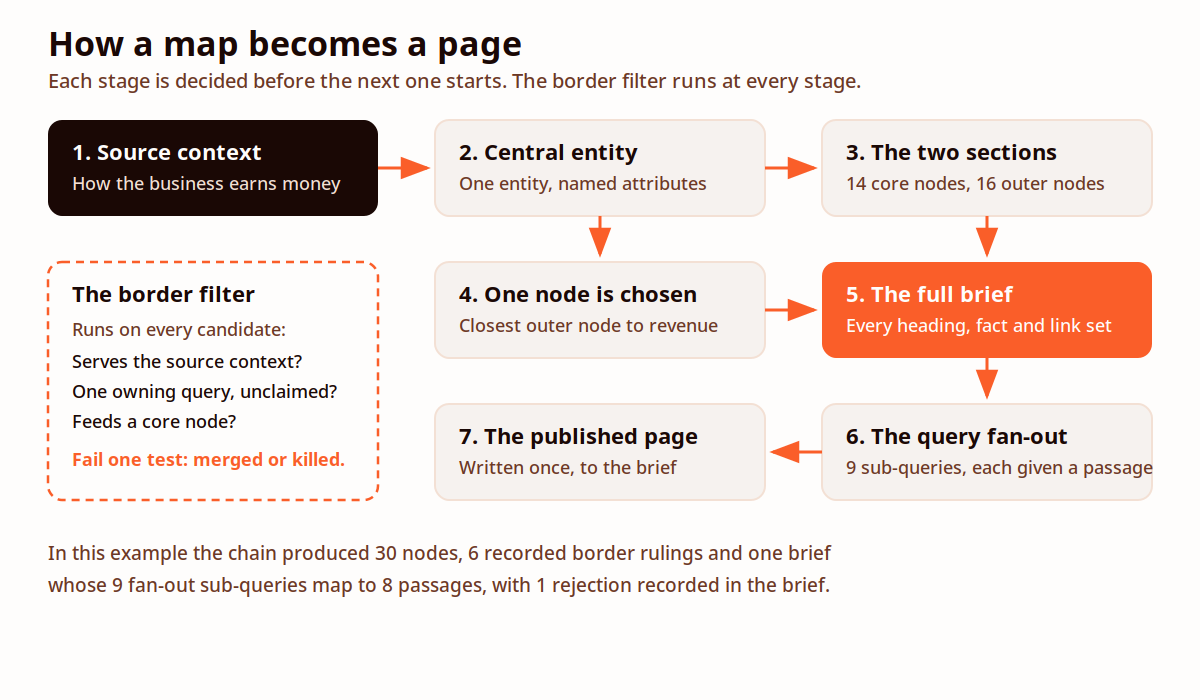
This post publishes a complete worked example, built with the topical map method created by Koray Tuğberk Gübür, the founder of Holistic SEO & Digital. His formula sits underneath everything that follows: Topical Authority = Topical Coverage × Historical Data (OnCrawl case study, February 2021), restated in 2026 as coverage times historical data divided by the cost of retrieval. A topical map is the plan for the coverage. This example shows one fictional business, a full map of 30 nodes with a URL, an owning query and an intent for every node, the contextual bridges between the nodes, the publication order, the 6 border rulings that kept the map clean, one node expanded into a complete semantic content brief, and that brief’s query fan-out mapped passage by passage. Nothing is blurred and nothing is left blank.
What do people searching for a topical map example actually need to see?
They need to see a complete map with its decisions visible, and the current search results prove it. The pages that rank for this query in the US share one shape: they name Koray as the source of the method, they define the map’s vocabulary with a value for a real-shaped business next to each term, and they show a map as rows or as a diagram. The strongest of them runs two businesses through the method. What none of them publishes in one place is the full chain: a complete map, its border rulings, one node expanded into a complete brief, and the brief’s query fan-out. Each ranking page stops at least one step earlier. That gap is what this post fills, and it is also the honest test for any example you read: if the rulings and the brief are missing, you are looking at an illustration, not a worked example.
Which business is the example built for?
The example business is a fictional US retailer that sells electric standing desks, desk frames, desktops and desk accessories online. A worked example needs a real shape of business behind it, because a map built for nobody demonstrates nothing. Three facts about the business decide everything downstream:
| Decision | Value for this example |
|---|---|
| Source context | An online retailer whose revenue comes from selling electric standing desks and their accessories to home-office buyers in the US |
| Central entity | The electric standing desk: a desk whose height adjusts by motor, defined by attributes such as motor count, load capacity, height range and lift speed |
| Central search intent | The verbs buyers use around the entity: buy, compare, choose, size, set up, fix |
The source context is the filter for the whole map. Every candidate node is tested against one question: does this page help sell standing desks, or help a standing desk buyer, in a way a search engine can connect to the central entity? A node that fails the test does not enter the map, however much search volume it carries. That single filter is what semantic SEO adds to a keyword list.
Which entities and attributes does a topical map contain?
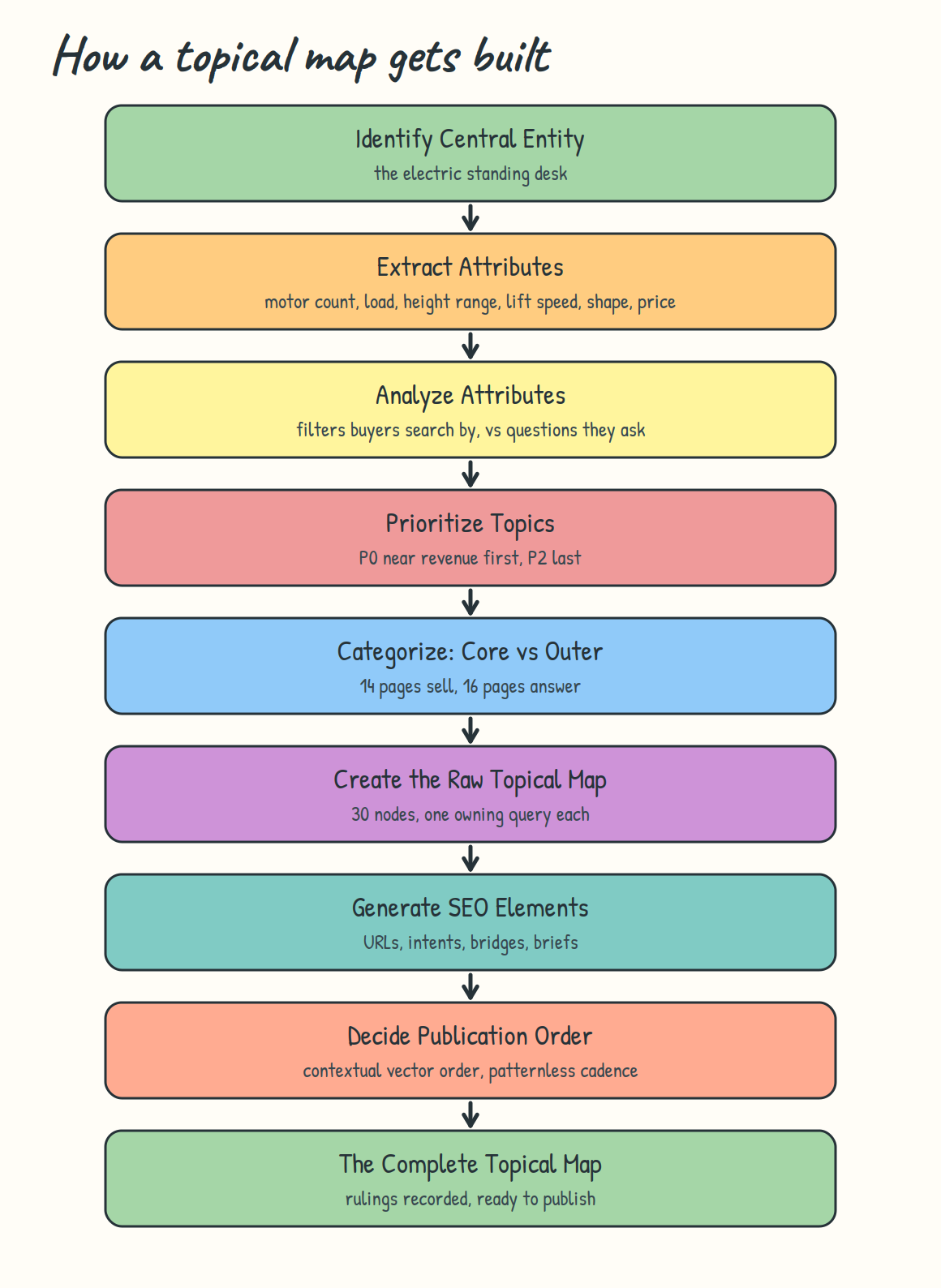
A topical map contains ten components, and each one carries a specific value for the business it is built for. A map that cannot state all ten values is not finished. These are Koray’s components, with the desk retailer’s value beside each one:
| Component | What it is | Value in this example |
|---|---|---|
| Source context | The perspective and function of the website: what it sells, to whom, and how it earns | Selling electric standing desks and accessories online to US home-office buyers |
| Central entity | The one subject every page on the site connects to | The electric standing desk |
| Central search intent | The primary actions users take around the entity, which shape the whole network | Buy, compare, choose, size, set up, fix |
| Root | The central entity’s own hub, the page every section hangs from | /standing-desks/, owning the query “standing desks” |
| Core section | The pages closest to the source context, mostly commercial, carrying the most important concepts and entities | 14 product and category pages that sell desks, frames, tops and accessories |
| Outer section | The pages further from the core, mostly informational, which bridge the central entity to its related entities and complete the subject | 16 guides that answer sizing, comparison, problem and care questions |
| Node | One page or section, recorded as an entity and attribute pair with one owning query, one intent and one URL | “Dual motor standing desk”: the entity restricted by the motor count attribute |
| Topical centroid | A concept that defines other concepts, the point several nodes are explained from | Motor count: it defines the two category pages, the comparison guide, the wobble guide and the load guide |
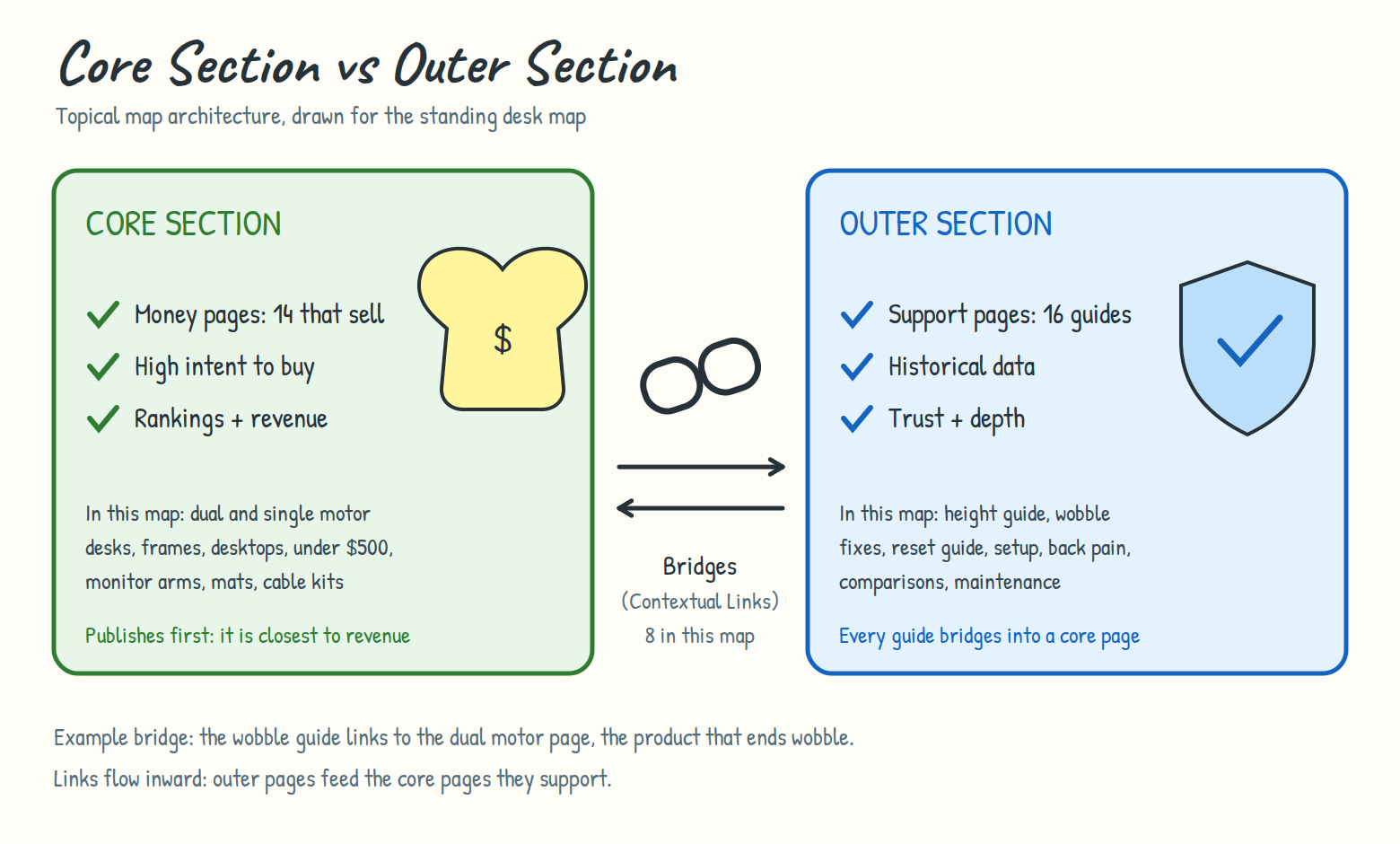
| Contextual bridge | A planned connection between two nodes, usually an outer page linking into the core page it supports | The wobble guide links to the dual motor category page, because dual motor legs are the permanent fix for wobble |
| Topical border | The recorded edge of the map: what was merged, what was killed, and why | 6 rulings, including office chairs killed as a second central entity |
Two components decide whether the finished map earns anything. The first is the topical centroid. Motor count is the centroid of this map: five nodes are explained from it, so the comparison node that owns it is the most valuable guide on the site, and it is briefed first among the outer nodes. The second is the bridge set. Koray’s own description of the outer section is that it bridges the central entity to the other main entities of the map. A bridge is not a link added after writing. It is drawn on the map before writing, with its direction fixed: outer pages link inward to the core pages they support, and core pages link across to their sibling attributes.
The formula applies to this map concretely. Topical coverage is the 30 nodes: complete for one product category, with no attribute a buyer searches left unowned. Historical data is what the map starts earning the day the first nodes publish, and it is why the publication order below publishes connected nodes together instead of scattering them. Cost of retrieval is kept low by the map’s discipline: one owning query per node, no duplicate pages for a crawler to compare, and no off-context nodes diluting what the site is about.
What does the complete topical map contain?
The complete map contains 30 nodes: 14 in the core section, which holds the pages that sell, and 16 in the outer section, which holds the pages that answer questions and feed authority into the core. Each node has exactly one owning query. Two nodes never share a query, and a query that two candidate pages both want is resolved before anything is written, not after both pages are published.
The core section: which pages sell the desks?
| Node | URL | Owning query | Intent | Priority |
|---|---|---|---|---|
| Standing desks hub | /standing-desks/ | standing desks | Commercial | P0 |
| Electric standing desks | /standing-desks/electric/ | electric standing desk | Transactional | P0 |
| Dual motor standing desks | /standing-desks/dual-motor/ | dual motor standing desk | Transactional | P0 |
| Single motor standing desks | /standing-desks/single-motor/ | single motor standing desk | Transactional | P1 |
| L-shaped standing desks | /standing-desks/l-shaped/ | l shaped standing desk | Transactional | P1 |
| Small standing desks | /standing-desks/small/ | small standing desk | Transactional | P1 |
| Standing desk frames | /standing-desks/frames/ | standing desk frame | Transactional | P1 |
| Standing desk tops | /standing-desks/desktops/ | standing desk top | Transactional | P2 |
| Standing desks under $500 | /standing-desks/under-500/ | standing desk under 500 | Transactional | P1 |
| Gaming standing desks | /standing-desks/gaming/ | gaming standing desk | Transactional | P2 |
| Standing desk converters | /standing-desks/converters/ | standing desk converter | Transactional | P2 |
| Monitor arms | /accessories/monitor-arms/ | monitor arm for standing desk | Transactional | P2 |
| Anti-fatigue mats | /accessories/anti-fatigue-mats/ | anti fatigue mat for standing desk | Transactional | P2 |
| Cable management kits | /accessories/cable-management/ | cable management for standing desk | Transactional | P2 |
Read the core section as the entity’s attribute grid turned into URLs. Motor count splits into two nodes because buyers search it as a product filter. Desk shape splits into L-shaped and small because both are searched as product types, not as advice. Price becomes one node at the $500 line because that is the boundary between the retailer’s single motor and dual motor ranges. Accessories sit in the core, not the outer section, because the retailer sells them and the queries are transactional.
The outer section: which pages answer the buyers’ questions?
| Node | URL | Owning query | Intent | Priority |
|---|---|---|---|---|
| Standing desk height guide | /guides/standing-desk-height/ | how tall should a standing desk be | Informational | P0 |
| Single motor vs dual motor | /guides/single-vs-dual-motor/ | single motor vs dual motor standing desk | Commercial | P0 |
| Standing desk vs converter | /guides/standing-desk-vs-converter/ | standing desk vs converter | Commercial | P1 |
| Desk size guide | /guides/standing-desk-size/ | what size standing desk do I need | Informational | P1 |
| Height for short users | /guides/standing-desk-for-short-people/ | standing desk for short people | Informational | P1 |
| Height for tall users | /guides/standing-desk-for-tall-people/ | standing desk for tall people | Informational | P1 |
| Weight capacity explained | /guides/standing-desk-weight-capacity/ | how much weight can a standing desk hold | Informational | P1 |
| Wobble causes and fixes | /guides/standing-desk-wobble/ | why does my standing desk wobble | Informational | P1 |
| Desk will not rise | /guides/standing-desk-not-going-up/ | standing desk not going up | Informational | P1 |
| Controller reset guide | /guides/standing-desk-reset/ | how to reset a standing desk | Informational | P2 |
| Assembly guide | /guides/standing-desk-assembly/ | how to assemble a standing desk | Informational | P2 |
| Ergonomic setup guide | /guides/standing-desk-setup/ | standing desk setup ergonomics | Informational | P1 |
| Standing time guide | /guides/how-long-to-stand/ | how long should you stand at a standing desk | Informational | P2 |
| Back pain question | /guides/standing-desk-back-pain/ | are standing desks better for your back | Informational | P2 |
| Maintenance guide | /guides/standing-desk-maintenance/ | how to maintain a standing desk | Informational | P2 |
| Accessories guide | /guides/standing-desk-accessories/ | standing desk accessories | Commercial | P2 |
The outer section is built from the same attributes as the core. Height range produces three nodes (the height guide, the short-user node, the tall-user node) because the attribute has three distinct query shapes. Motor mechanics produce the problem nodes (wobble, desk will not rise, controller reset), and every problem node links to the product node that solves the problem permanently. An outer node with no core node to feed is a traffic page with no commercial job, and this map contains none.
Which contextual bridges connect the sections?
Eight bridges carry the map’s internal linking, and each one is drawn before any page is written:
| Bridge (from, to) | Why this connection exists |
|---|---|
| Wobble guide, to dual motor category page | The guide names synchronised dual motor legs as the permanent fix, so the reader with the problem meets the product that ends it |
| Weight capacity guide, to standing desk frames | Load ratings belong to the frame, not the desktop; the guide’s answer points at the component that carries the load |
| Height guide, to standing desks hub | The guide computes the reader’s correct height; the hub is where that height becomes a product filter |
| Height for tall users, to dual motor category page | Tall users need the highest lift range, which only the dual motor range reaches |
| Single vs dual motor comparison, to both motor category pages | The comparison exists to route a decided buyer to the page that sells his decision |
| Desk will not rise guide, to controller reset guide, then to frames | The two problem guides form a chain: diagnose, reset, replace the frame if both fail |
| Ergonomic setup guide, to monitor arms and anti-fatigue mats | Setup advice names the two accessories as part of the correct setup, and both are sold in the core |
| Accessories guide, to all three accessory category pages | The guide is the outer section’s index of the accessory range |
In which order do the nodes get published?
Nodes publish in contextual vector order: a page goes live after the pages it depends on and links to, so no published page ever points at a gap. For this map the order is fixed. First the root and the P0 core: the hub, electric standing desks, dual motor standing desks. Then the two P0 outer nodes that bridge straight into them: the height guide and the single versus dual motor comparison, briefed first because the comparison owns the map’s centroid. Then the P1 core (single motor, L-shaped, small, frames, under $500), then the P1 outer nodes that feed them, and the P2 nodes last. Publication follows a patternless cadence inside that order, steady rather than bursty, because historical data accrues from coverage held over time, and a map published in dependency order starts earning it as a connected network instead of as isolated pages.
Which candidate nodes were merged or killed, and why?
Six candidates were ruled on at the border of the map, and the rulings matter more than the nodes. A map that accepts every candidate is a keyword list with better formatting.
| Candidate | Ruling | Reason |
|---|---|---|
| Are dual motor standing desks worth it | Merged into /guides/single-vs-dual-motor/ | Same intent as the comparison node: a buyer deciding between two motor types. Two pages on one intent would compete with each other. It survives as one H2 inside the comparison brief. |
| Standing desk deals | Killed as a node | A promotion is a state, not a topic. It runs as a banner on the hub and the under-$500 node, and it leaves no orphan page when the promotion ends. |
| Office chairs | Killed | A different central entity with its own attribute grid. One chair page would not rank, and 40 chair pages would make the site about two topics. Chairs belong to a second map if the retailer ever sells them. |
| Treadmill desks | Killed | The retailer does not sell them, so the source context fails. A guide would attract readers the business cannot serve and queries it cannot convert. |
| DIY standing desk | Killed | The retailer sells finished desks and frames, not DIY kits. The query’s intent (build one yourself) contradicts the source context (buy one built). |
| Competitor brand pages | Killed | Pages about named rival brands are not ownable nodes on a retailer’s own map. Brand comparisons live inside the comparison nodes as attribute tables, not as standalone pages. |
The merge ruling is the one most sites get wrong. “Worth it” queries and “versus” queries look different in a keyword tool and identical in intent: both are asked by a buyer who has narrowed the choice to two motor types and wants a verdict. The map records the merge, so no writer ever briefs the second page by accident.
How does one node become a complete content brief?
One node becomes a brief by inheriting everything the map already decided: the node’s macro context is its owning query’s intent, its entities are the central entity and its attributes, and its internal links are the node’s bridges in the map. The brief below is complete for the node /guides/single-vs-dual-motor/. The method behind the format is set out in our guide to how to create a semantic content brief; what follows is the filled artefact.
Brief header. URL: /guides/single-vs-dual-motor/. Owning query: single motor vs dual motor standing desk. Intent: commercial investigation. Macro context: the attribute differences between single motor and dual motor standing desks, and which buyer each type serves. Central entity: the electric standing desk. Attributes in play: motor count, load capacity, lift speed, stability, duty cycle, price.
| Heading | What the block must establish | Structure | Links to |
|---|---|---|---|
| H1: Single Motor vs Dual Motor Standing Desks: Load, Speed, Stability and Price | The page’s promise: a verdict built on four named attributes | Title only | None |
| Opening block (no heading) | The direct answer in under 60 words: dual motor lifts more, lifts faster and wobbles less; single motor costs less and serves desks up to 55 inches with one monitor setup | One paragraph, answer first | /standing-desks/dual-motor/ |
| H2: What is the difference between a single motor and a dual motor standing desk? | Single motor: one motor drives both legs through a connecting drive rod. Dual motor: one motor inside each leg, synchronised by the control box | Two short paragraphs with one labelled diagram | None |
| H2: How much weight can each motor type lift? | Typical rated loads: single motor frames 150 to 200 lb, dual motor frames 265 to 350 lb, including the desktop and everything on it | Attribute table: motor type, rated load, what the load must include | /guides/standing-desk-weight-capacity/ |
| H2: Which motor type lifts faster? | Typical lift speeds: single motor about 1.0 inch per second, dual motor 1.4 to 1.6 inches per second; a full sit-to-stand move takes about 20 seconds against about 13 | Two values, one computed comparison | None |
| H2: Which motor type is more stable at full height? | Dual motor legs move in sync, so the desktop stays level under uneven loads; single motor desks wobble more at full extension, especially above 48 inches | Cause and effect in three sentences, then one value table | /guides/standing-desk-wobble/ |
| H2: How long does each motor type last? | Both types share the standard duty cycle of 2 minutes of movement in any 18 minutes. Cycle ratings and warranty length differ by price band, not by motor count alone | Facts first, then the duty cycle warning | None |
| H2: What does the price difference actually buy? | A typical gap of $80 to $200 buys the second motor, the higher load rating and the faster lift. It buys nothing else: desktop material and accessories are identical across both ranges | Price gap mapped to the three attributes it pays for | /standing-desks/under-500/ |
| H2: Are dual motor standing desks worth it? | The merged “worth it” node, answered as a verdict: worth it for desks 63 inches and wider, dual monitor setups and users over 6 feet; not worth it for a 48 inch desk with a laptop | Verdict first, then the three buyer cases | /standing-desks/electric/ |
| H2: Which motor type should you choose? | The decision in one table: desk width, total load and user height mapped to a motor type | Decision table, 4 rows | /standing-desks/single-motor/ and /standing-desks/dual-motor/ |
| FAQ block | 4 questions: can a single motor desk hold two monitors; can you upgrade a single motor desk to dual motor later (no, the frame differs); which type is quieter (near identical, both typically under 50 dB); does motor type affect the warranty | Question and direct answer pairs | None |
Two properties make this a brief and not an outline. First, every block states the fact it must establish, with the values the writer must use, so two writers given this brief produce the same page. Second, every internal link is assigned to the block where it is relevant, with its destination fixed by the map, so the writer never invents a link for count. The writing itself then follows the semantic content writing rules: direct factual sentences, one idea each, the answer before the explanation.
What does the brief’s query fan-out look like?
The brief’s query fan-out is the list of sub-queries an AI answer engine creates when a user asks the node’s question in ChatGPT, Perplexity or Google AI Overviews. The engine does not search the seed query once. It decomposes it, searches the parts, and assembles an answer from passages. Research on AI search sessions has measured fan-out at up to roughly 30 sub-queries behind a single prompt in agentic sessions, and query augmentation is the mechanism that generates them. A brief that ignores the fan-out writes one passage for the seed query and leaves the other passages to competitors.
For the seed query “single motor vs dual motor standing desk”, the modelled fan-out and the passage that answers each sub-query:
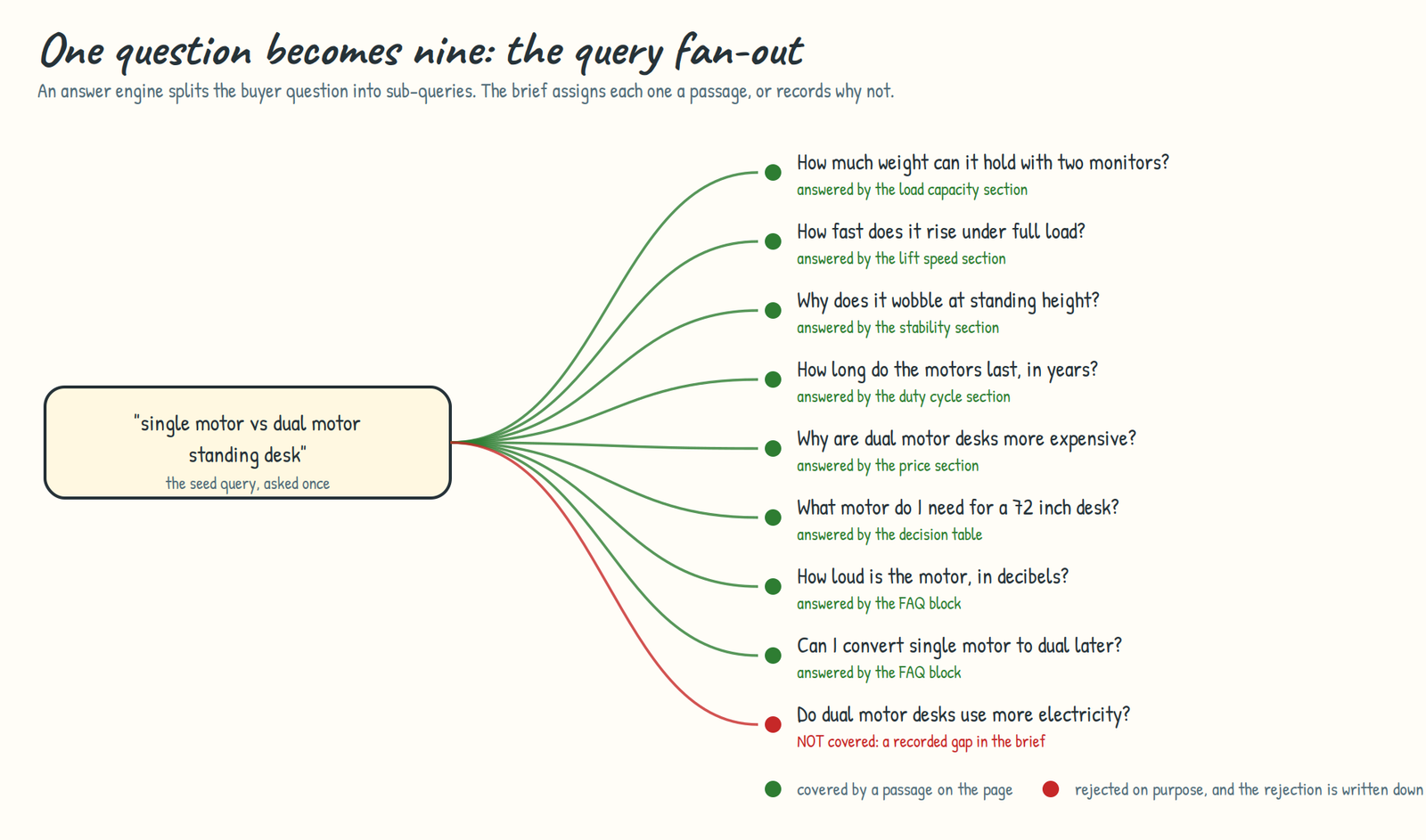
| Fan-out sub-query | Answered by | Why it belongs there |
|---|---|---|
| How much weight can a dual motor standing desk hold with two monitors | The load capacity H2, which states the rating includes everything on the desktop | The passage names the exact scenario the sub-query asks about |
| How fast does a standing desk rise under full load | The lift speed H2 | Speed is stated as a value, not an adjective, so the passage can be extracted whole |
| Why does a standing desk wobble at standing height | The stability H2, which gives the synchronisation cause | The brief assigns the cause to this page instead of leaving it only on the wobble guide |
| How long do standing desk motors last in years | The duty cycle H2 | The fan-out asks in years; the block answers with the cycle rating the years derive from |
| Why are dual motor standing desks more expensive | The price H2 | The block maps the price gap to three named attributes, which is the answer’s raw material |
| What motor do I need for a 72 inch standing desk | The decision table in the final H2 | A table row is the most extractable passage shape for a sizing question |
| How loud is a standing desk motor in decibels | The FAQ block (under 50 dB for both types) | A small fact with its own question gets a passage of its own |
| Can you convert a single motor desk to dual motor | The FAQ block (no, the frame, legs and control box differ) | A yes or no sub-query needs a passage that opens with the verdict |
| Do dual motor desks use more electricity | Not covered on this page | The fan-out is a map input, not a command: this sub-query is low value for the node’s intent and is recorded as a deliberate gap |
The last row is the discipline. A fan-out table with no rejected rows is a wish list. This one records the rejection, so the page stays on its macro context and the electricity question can be ruled on again when the map is next revised.
What do you check before a map becomes pages?
Before a map becomes pages, you check five things, in this order:
- One owning query per node. Search the node list for duplicates. Any query claimed by two nodes means a merge ruling is missing.
- Every outer node feeds a core node. Trace each outer node’s primary bridge. An outer node whose only links point to other outer nodes is a traffic island.
- The border rulings are written down. Merges and kills live in the map document, not in a meeting. An unrecorded kill gets briefed again within a quarter.
- The P0 nodes have briefs before any P2 node is written. Build order follows revenue distance, not writer preference. In this map, the hub, the two motor category pages, the height guide and the comparison node are briefed first.
- Every brief names its fan-out gaps. A brief that silently omits a sub-query will be “fixed” later by someone adding a section. A brief that records the rejection protects the page’s macro context.
Frequently asked questions
Who created the topical map method?
Koray Tuğberk Gübür created it. He is the founder of Holistic SEO & Digital, and he published the topical authority formula, Topical Authority = Topical Coverage × Historical Data, in an OnCrawl case study in February 2021. The vocabulary this example uses (source context, central entity, core section, outer section, contextual bridge) is his, and the practitioners who rank for this topic say so on their pages. So does this one.
How many nodes should a topical map have?
A topical map should have exactly as many nodes as the entity’s attribute grid and the business’s source context justify, and not one more. This worked example has 30 nodes for one product category. A local service business may need 12. A multi-category retailer may need 300. The count is an output of the method, never a target set before the research.
What is the difference between the core section and the outer section?
The core section holds the pages closest to the source context: mostly commercial pages that carry the most important entities and sell. The outer section holds the pages further out: mostly informational pages that answer questions, earn impressions and historical data, and bridge the central entity to its related entities. Links flow inward, from outer pages to the core pages they support.
Is a topical map the same as a topic cluster?
No. A topic cluster groups articles around one pillar page by keyword similarity. A topical map decides which pages should exist at all, across the whole subject: product pages, guides, problem pages and the pages that must never be built. The cluster is one shape a section of a map can take.
Can a topical map be built from a keyword list?
A keyword list is one input, not the map. The map adds what the list cannot show: the entity and its attributes, the source context that filters candidates, the merge and kill rulings, and the build order. Starting from the list alone produces nodes for queries the business cannot serve, like the treadmill desk node killed in this example.
How long does it take to build a topical map like this one?
A 30-node map for one product category takes one to two weeks of research and ruling, including the SERP checks behind the merge decisions. The first brief, written in the format shown here, takes one to two days once the map exists, because the map has already made the structural decisions.
What happens to the map after the pages are published?
The map becomes the site’s change log. New query data from Search Console and AI search is ruled against it: a new node, a merge, or a recorded rejection. A map that is never revised after launch decays into the keyword list it replaced within a year.
What does your map look like?
If your content plan is a spreadsheet of keywords with no recorded rulings, you do not have a map yet, and every new page is a fresh argument. We build maps the way this example is built: every node owned, every border ruling written down, every brief carrying its fan-out. Start with a semantic topical map for your central entity, or run our free site audit first and see which of your existing pages have no node to belong to.

Written by Hanzala Khan
Hanzala Khan has over 5 years of specialized experience in entity-based search optimization, Knowledge Graph engineering, and topical authority architectures. He specializes in designing custom semantic topical maps, advanced Schema.org data layers, and algorithmic authorship frameworks that help enterprise brands achieve durable search dominance and AI citation authority across Google, Perplexity, and ChatGPT.
2 Responses